
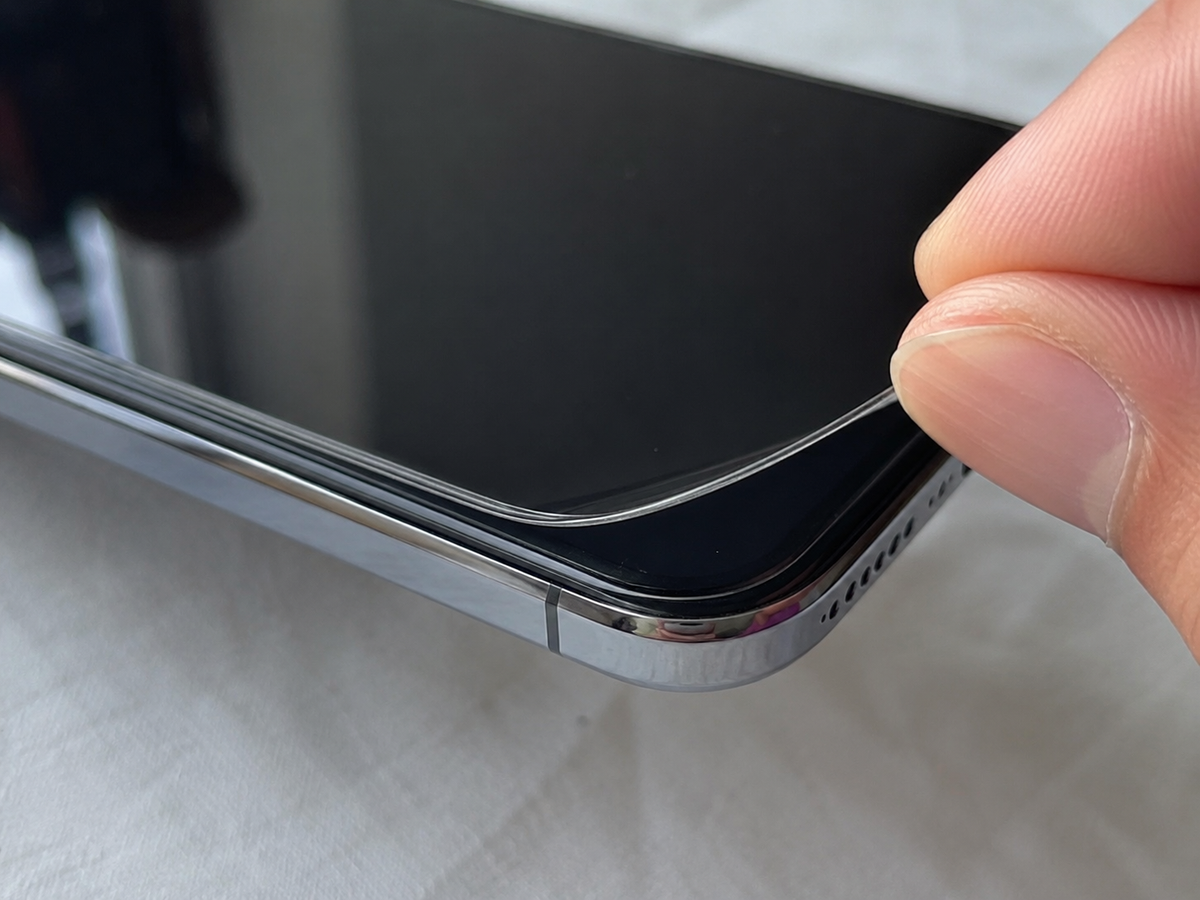
A screen protector is designed to shield your smartphone from scratches, scuffs, and minor impacts. When installed correctly, it can keep your screen looking new while preserving its resale value. However, one issue that many smartphone users encounter is the edges of the screen protector beginning to lift after only a short period of use.
Experiencing screen protector lifting at edges can be frustrating because it affects both the appearance and functionality of the protector. As the edges peel away, dust and debris collect underneath, air bubbles become more noticeable, and the adhesive gradually loses its grip. In many cases, the problem is not caused by a defective product but by installation methods, phone accessories, or everyday use.
This guide explains the most common causes of edge lifting, practical edge peeling fix methods, and simple maintenance tips to help you avoid similar screen protector problems in the future.
What Causes Screen Protector Lifting at the Edges?
Several factors can cause a screen protector to lose adhesion around its edges. While some issues develop during installation, others appear gradually through daily use. Understanding these causes helps you choose the right solution before replacing the protector.
Improper Installation
Incorrect installation is one of the leading causes of edge lifting. If the protector is slightly misaligned or applied too quickly, parts of the adhesive may not bond properly with the display. Although the protector may look perfectly installed at first, weak areas often begin peeling after a few days.
Another common mistake is failing to press the protector evenly across the entire screen. Uneven pressure leaves small gaps where air can enter, gradually weakening the adhesive around the edges.
Dust and Dirt Under the Protector
Even tiny dust particles can prevent a screen protector from sticking properly. If the display is not completely clean before installation, the adhesive cannot form a secure bond where dirt is trapped. Over time, these small gaps become larger as air enters beneath the protector.
Once dust starts collecting underneath the lifted edge, the problem usually spreads further across the display. This is why installing the protector in a clean environment is always recommended.
Poor Quality Adhesive
Not every screen protector uses the same adhesive technology. Lower-quality products often lose their grip more quickly, especially after exposure to heat, humidity, or frequent handling. As the adhesive weakens, the edges become the first areas to lift.
Choosing a high-quality protector designed specifically for your phone model improves long-term durability and reduces the risk of early peeling.
How Curved Displays Affect Screen Protector Fit
Many modern smartphones feature curved displays that extend slightly around the edges. While these screens improve the overall look and feel of the device, they can also make it more difficult for standard screen protectors to adhere properly.
A protector that fits a flat display perfectly may struggle to maintain full contact with a curved screen, increasing the chances of edge lifting.
Why Flat Protectors Lift on Curved Screens
Traditional screen protectors are manufactured for flat surfaces. When installed on a curved display, the center usually sticks well, but the adhesive near the edges cannot always maintain full contact with the glass.
As you use your phone throughout the day, these unsupported edges experience additional stress. Eventually, they begin separating from the screen, allowing dust and air to enter underneath.
Benefits of Using a Curved Edge Protector
A curved edge protector is designed to match the shape of smartphones with rounded displays. Instead of stopping before the curve, it follows the natural contour of the screen to provide better edge coverage.
Because the adhesive maintains more consistent contact with the display, curved edge protectors are generally less likely to peel than standard flat protectors on compatible devices.
Choosing the Right Fit for Your Device
Before purchasing a replacement, always check that the protector is made for your exact phone model. Even phones within the same product line can have slightly different screen dimensions.
Using a properly fitted protector improves installation, enhances protection, and reduces the possibility of lifting around the edges.
Can Your Phone Case Cause Edge Peeling?
Many users focus on the screen protector itself while overlooking the role of their phone case. In reality, certain cases place continuous pressure on the edges of the protector, gradually causing the adhesive to separate from the display.
This issue is especially common with heavy-duty cases that wrap tightly around the front of the phone.
How Phone Cases Push Against the Protector
Some phone cases extend over the bezel and make direct contact with the outer edge of the protector. Every time the phone is inserted into or removed from the case, slight pressure is applied to the adhesive.
Although this pressure may seem insignificant, repeating it regularly can eventually cause the edges to lift.
Why a Case Friendly Protector Helps
A case friendly protector leaves a narrow gap around the perimeter of the display. This additional space allows compatible phone cases to fit without touching the protector itself.
Because the case no longer presses against the edges, the adhesive experiences less stress during everyday use, helping the protector stay securely attached for longer.
Checking Case Compatibility
If you recently changed your phone case and noticed the protector starting to peel, the two accessories may not be compatible. Comparing the fit with or without the case can help identify the cause.
Choosing products specifically labeled as compatible with one another often provides the best long-term results.
How to Fix a Screen Protector That Is Lifting
A lifting screen protector does not always need to be replaced immediately. The right edge peeling fix depends on how severe the problem is and whether the adhesive is still in good condition. In some cases, cleaning the affected area is enough, while in others, replacing the protector is the better long-term solution.
Clean the Lifted Edge
If only a small corner or edge has started lifting, inspect the area carefully for dust and debris. Tiny particles trapped beneath the protector often prevent the adhesive from making proper contact with the display.
Use a dust removal sticker or a piece of clean adhesive tape to remove any debris. Avoid touching the adhesive with your fingers because natural skin oils can reduce its ability to stick. Once the area is clean, press the protector back into place with a microfiber cloth, applying gentle pressure from the center toward the edge.
Reapply the Protector Carefully
Sometimes the protector lifts because it was not aligned correctly during installation. If the adhesive is still clean and has not lost its strength, carefully repositioning the protector may improve its fit and reduce edge lifting.
Before reapplying the protector, make sure the screen is completely free from dust and fingerprints. Taking your time during alignment helps create even contact across the display and reduces stress on the adhesive.
Replace the Protector When Necessary
If the protector continues lifting after cleaning or repositioning, the adhesive has likely worn out. Once dust contaminates the adhesive or large sections begin peeling, restoring a secure bond becomes difficult.
Replacing the protector with one designed specifically for your phone model is usually the most effective solution. A quality replacement provides better adhesion, improved durability, and a cleaner appearance.
How to Prevent Screen Protector Problems
Preventing screen protector problems is much easier than fixing them after they appear. Choosing the right accessories and following proper installation practices can significantly extend the life of your screen protector.
Install the Protector in a Clean Environment
The installation environment has a direct impact on how well the protector adheres. Dust floating in the air can settle on the screen within seconds, creating small gaps beneath the adhesive that eventually lead to edge lifting.
Clean the display thoroughly using an alcohol wipe and microfiber cloth before installation. Applying the protector slowly in a clean indoor environment improves adhesion and reduces the chances of trapped debris.
Choose the Right Screen Protector
A screen protector designed specifically for your phone model offers a better fit than a universal alternative. Proper sizing helps distribute adhesive evenly across the display and reduces the likelihood of peeling around the edges.
If your smartphone has a curved display, selecting a curved edge protector provides better coverage. Likewise, using a case friendly protector helps prevent pressure from compatible phone cases.
Handle Your Phone Carefully
Daily habits also affect the lifespan of your screen protector. Frequently removing your phone case, exposing the device to extreme temperatures, or placing it in tight pockets can gradually weaken the adhesive around the edges.
Cleaning the screen regularly with a soft microfiber cloth helps prevent dirt from collecting around the protector. Taking simple precautions during everyday use can help maintain strong adhesion for a longer period.
When Should You Replace Your Screen Protector?
Although minor lifting can often be repaired, some situations require a replacement. If multiple edges have lifted, dust continues entering beneath the protector, or the glass has cracked, installing a new protector is the better option.
Touch sensitivity is another sign that replacement may be necessary. If swipes and taps no longer respond consistently, the protector may no longer be sitting correctly on the display. Replacing it restores both protection and usability.
Most quality screen protectors last for several months with proper care. Replacing them when signs of wear become noticeable helps maintain reliable protection for your smartphone.
Final Thoughts
Experiencing screen protector lifting at edges is a common issue, but it is usually caused by factors that can be prevented. Improper installation, trapped dust, incompatible phone cases, curved displays, and everyday wear all contribute to weakened adhesion over time.
Understanding these causes makes it easier to choose the right edge peeling fix before the problem becomes worse. Installing the protector correctly, selecting a case friendly protector, and using a curved edge protector when appropriate can greatly reduce future screen protector problems.
By following proper installation and maintenance practices, you can extend the life of your screen protector and keep your device protected. Clear Lizard recommends choosing products that are designed for your specific phone model to achieve the best fit and long-lasting performance.
Frequently Asked Questions
1. Why is my screen protector lifting at the edges?
Screen protector lifting at the edges is commonly caused by trapped dust, improper installation, pressure from an incompatible phone case, curved displays, or adhesive that has weakened over time.
2. Can I fix a peeling screen protector without replacing it?
Yes. If only a small section has been lifted and the adhesive is still clean, removing trapped dust and pressing the protector back into place may solve the problem. Severe lifting usually requires replacement.
3.Does a phone case cause screen protector lifting?
Yes. Some phone cases press against the edges of the protector and gradually weaken the adhesive. Using a case friendly protector helps reduce this issue.
4. Are curved edge protectors better than flat protectors?
For smartphones with curved displays, a curved edge protector provides better edge coverage and is generally less likely to lift than a standard flat protector.
5. How can I prevent screen protector problems?
Installing the protector on a clean screen, choosing the correct size, using compatible phone cases, and avoiding unnecessary pressure on the edges are the best ways to prevent common screen protector problems.


Share:
How to Install a Tempered Glass Screen Protector Without Bubbles
Do You Really Need a Screen Protector for iPhone 16 and iPhone 17? Experts Explain